Boids
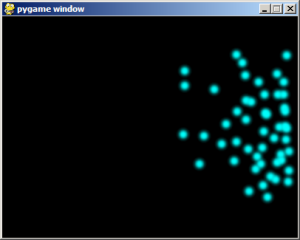
I recently came across an article that mentioned boids, which is essentially a computer simulation of a flock a birds. Boids uses three simple rules, from which complex behaviour emerges. Having studied large scale distributed systems I'm familiar with emergent behaviour, but I haven't seen anything that looks as impressive as boids.
The three rules of the Boid system are:
Rule 1: Don't overcrowd near-by boids Rule 2: Move closer to near-by boids Rule 3: Move in the general direction of the other boids
I thought I'd have a crack at implementing my own boids. I hadn't used PyGame before, but it looked ideal for this project.
First I came up with a basic boid class that stores the boids position and velocity.
class Boid:
    def __init__(self, x, y):
        self.x = x
        self.y = y
        self.velocityX = random.randint(1, 10) / 10.0
        self.velocityY = random.randint(1, 10) / 10.0
I added a method to move the boid based on its velocity, and a method to detect the distance between two boids. Then I added the code for each of the rules. Rule 1: Don't overcrowd near-by boids.
    "Move away from a set of boids. This avoids crowding"
    def moveAway(self, boids, minDistance):
        if len(boids) < 1: return

        distanceX = 0
        distanceY = 0
        numClose = 0

        for boid in boids:
            distance = self.distance(boid)
            if  distance < minDistance:
                numClose += 1
                xdiff = (self.x - boid.x)
                ydiff = (self.y - boid.y)

                if xdiff >= 0: xdiff = math.sqrt(minDistance) - xdiff
                elif xdiff < 0: xdiff = -math.sqrt(minDistance) - xdiff

                if ydiff >= 0: ydiff = math.sqrt(minDistance) - ydiff
                elif ydiff < 0: ydiff = -math.sqrt(minDistance) - ydiff

                distanceX += xdiff
                distanceY += ydiff

        if numClose == 0:
            return

        self.velocityX -= distanceX / 5
        self.velocityY -= distanceY / 5
Rule 2: Move closer to near-by boids.
    "Move closer to a set of boids"
    def moveCloser(self, boids):
        if len(boids) < 1: return

        # calculate the average distances from the other boids
        avgX = 0
        avgY = 0
        for boid in boids:
            if boid.x == self.x and boid.y == self.y:
                continue

            avgX += (self.x - boid.x)
            avgY += (self.y - boid.y)

        avgX /= len(boids)
        avgY /= len(boids)

        # set our velocity towards the others
        distance = math.sqrt((avgX * avgX) + (avgY * avgY)) * -1.0

        self.velocityX -= (avgX / 100)
        self.velocityY -= (avgY / 100)
Rule 3: Move in the general direction of the other boids
    "Move with a set of boids"
    def moveWith(self, boids):
        if len(boids) < 1: return
        # calculate the average velocities of the other boids
        avgX = 0
        avgY = 0

        for boid in boids:
            avgX += boid.velocityX
            avgY += boid.velocityY

        avgX /= len(boids)
        avgY /= len(boids)

        # set our velocity towards the others
        self.velocityX += (avgX / 40)
        self.velocityY += (avgY / 40)
So that was the boid code sorted. Then all that was required was some code to tie it all together and display the boids:
pygame.init()

size = width, height = 800, 600
black = 0, 0, 0

maxVelocity = 10
numBoids = 50
boids = []

screen = pygame.display.set_mode(size)

ball = pygame.image.load("ball.png")
ballrect = ball.get_rect()

# create boids at random positions
for i in range(numBoids):
    boids.append(Boid(random.randint(0, width), random.randint(0, height)))

while 1:
    for event in pygame.event.get():
        if event.type == pygame.QUIT: sys.exit()

    for boid in boids:
        closeBoids = []
        for otherBoid in boids:
            if otherBoid == boid: continue
            distance = boid.distance(otherBoid)
            if distance < 200:
                closeBoids.append(otherBoid)

        boid.moveCloser(closeBoids)
        boid.moveWith(closeBoids)
        boid.moveAway(closeBoids, 20)

        # ensure they stay within the screen space
        # if we roubound we can lose some of our velocity
        border = 25
        if boid.x < border and boid.velocityX < 0:
            boid.velocityX = -boid.velocityX * random.random()
        if boid.x > width - border and boid.velocityX > 0:
            boid.velocityX = -boid.velocityX * random.random()
        if boid.y < border and boid.velocityY < 0:
            boid.velocityY = -boid.velocityY * random.random()
        if boid.y > height - border and boid.velocityY > 0:
            boid.velocityY = -boid.velocityY * random.random()

        boid.move()

    screen.fill(black)
    for boid in boids:
        boidRect = pygame.Rect(ballrect)
        boidRect.x = boid.x
        boidRect.y = boid.y
        screen.blit(ball, boidRect)
    pygame.display.flip()
I'm really impressed with the results! From the interaction of three simple rules some quite complex behaviour emerges.