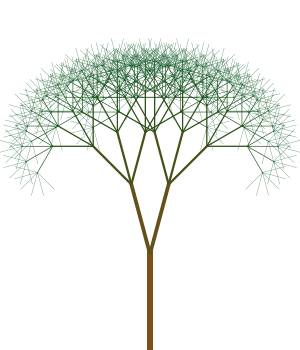
Recursively Drawing Trees with JavaScript and Canvas

November 22, 2009

I have written an article titled Graphics Programming with Canvas for the upcoming December 2009 edition of JSMag. One of the examples I came up with for the article was a recursive tree drawing algorithm. I had quite a bit of fun tweaking different values and seeing what sort of tree would be produced. After a while it got a bit boring changing a value, saving the JavaScript and then refreshing the page, so with the help of jQuery UI I came up with an interactive version. Below are a couple of tree images I’ve generated with the tool:

tree

tree


You can view the page source to see what’s going on behind the scenes, but for full details check out the December edition of JSMag. Give it a try for yourself, generate your own tree!

4 Comments »

  1. I don’t know if it’s proper to ask here about problems using your neat program. Just in case it is, here’s a clueless newbie question:

    I downloaded your program and the ui.slider.js, putting the latter in my own library.
    The program works fine except that the sliders don’t appear. Firebug makes no complaint.
    The same thing happens when I replace the reference to my local copy of ui.slider.js with the online version.

    Is there some obvious reason why I’m having this problem?

    Comment by Harvey S. Frey — November 23, 2009 @ 6:50 am

  2. Hi Harvey,

    The sliders are part of jQuery UI. If you’re downloading the page to run it locally you’ll also need the jQuery file and the CSS files.

    Thanks, Ben

    Comment by Ben — November 23, 2009 @ 9:34 am

  3. See also http://lsysjs.qwert.ch/ which is a full blown L-System implementation done with Javascript and Canvas.

    Comment by "Painless" Doc Johnson — November 23, 2009 @ 12:04 pm

  4. Thanks for the great link!

    Comment by Ben — November 23, 2009 @ 12:12 pm

RSS feed for comments on this post.

Leave a comment